



Maximo | Interloc Solutions | IBM MAS | Maximo Application Suite (MAS) | IBM Maximo Application Suite
Using an OpenShift Mutating Admission Webhook to inject the IBM Semeru sunset bypass flag cluster-wide — without touching Operator-managed resources
Background and Problem Statement
IBM Semeru Runtime includes restricted security profiles used by MAS components operating in FIPS 140-2 mode. The applicable Semeru FIPS 140-2 restricted security profile reached its sunset date on 21 September 2026. From that date, any JVM container that starts under this profile will refuse to boot, producing errors that prevent pods from reaching a Running state.
The following MAS components are affected across their respective namespaces:
| Component | Namespace Pattern | Workload Type |
|---|---|---|
| Manage All Bundle | mas-<instance>-manage |
Deployment |
| Monitor Agent | mas-<instance>-manage |
Deployment |
| Manage Maxinst | mas-<instance>-manage |
Deployment |
| Manage JMS | mas-<instance>-manage |
StatefulSet |
| SCIM / Core services | mas-<instance>-core |
Various |
| Suite License Service (SLS) | ibm-sls |
Deployment |
IBM's documented workaround is to inject the JVM flag -Dsemeru.restrictedsecurity.ignoresunsetexpiration=true (together with -Dsemeru.restrictedsecurity.suppresssunsetwarning=true) via the _JAVA_OPTIONS environment variable. IBM Support confirmed this approach is supported as an interim measure and does not place the environment in an unsupported state.
oc set env Is Not EnoughManually patching the _JAVA_OPTIONS environment variable directly onto Operator-managed Deployments and StatefulSets works initially, but the changes will be silently reverted any time the Operator reconciles or recreates the workload — for example, during a MAS configuration change, a version update, or a cluster maintenance event. This produces an invisible failure mode that is difficult to diagnose after the fact.
To avoid this, we implement the workaround at the admission layer using an OpenShift Mutating Admission Webhook. The webhook intercepts each Pod CREATE event before the pod reaches the scheduler and injects the environment variable at that moment — regardless of what the Operator declared. This means the fix is self-healing: every time the Operator recreates a pod, the webhook reapplies the flag automatically.
Architecture Overview
Two independent webhooks are deployed, targeting different components with different injection strategies:
| Webhook | Target Scope | Strategy | Namespace Opt-in Label |
|---|---|---|---|
| Semeru Sunset Webhook | All MAS namespaces (Core, Manage, SCIM, etc.) | Inject _JAVA_OPTIONS env var into every container and initContainer on Pod CREATE, unless the variable is already set |
mas.io/semeru-sunset-workaround=enabled |
| SLS FIPS 1402 Webhook | ibm-sls namespace only — sls-api-licensing pod |
Inject an initContainer that copies and patches the IBM MAS FIPS profile properties file, clearing the sunsetDate property, then mounts the patched file over the original path |
mas.io/sls-1402-sunset-workaround=enabled |
Newer versions of SLS do accept _JAVA_OPTIONS and the general webhook above is sufficient. However, older SLS releases (such as SLS 3.12.x with the api-licensing image at the affected digest) use a Liberty-based startup script (setuprunwlp.py) that evaluates the restricted security profile independently of JVM environment variables, making _JAVA_OPTIONS ineffective for that container. If you are running a newer SLS version, you may not need this second webhook at all — test with the general webhook first and only deploy the SLS-specific one if sls-api-licensing pods continue to fail. For environments with older SLS releases, the only reliable fix is to patch the profile's RestrictedSecurity.NSS.MAS-FIPS-140-2.desc.sunsetDate property directly — which we do safely by copying the existing IBM profile from the image, appending a single line that clears the sunsetDate, and mounting the result as a volume overlay over the original path. The image itself is never modified.
Both webhooks:
- Run as highly-available 2-replica Deployments with pod anti-affinity across nodes.
- Use OpenShift's built-in service CA injection (
service.beta.openshift.io/inject-cabundle) for TLS — no manual certificate management required. - Run with a minimal security context: no privilege escalation, all capabilities dropped, read-only root filesystem.
- Are namespace-scoped via opt-in labels — they do not touch any namespace that is not explicitly labelled, minimizing blast radius.
- Are idempotent — if the variable or volume is already present, no mutation is applied.
Pre-requisites
- OpenShift 4.x cluster with cluster-admin access.
- The
ocCLI authenticated to the target cluster. - Access to
registry.access.redhat.com/ubi9/python-311:latest(or a mirrored equivalent in disconnected environments). - The two YAML manifests:
semeru-sunset-mutating-webhook-simplified-v3.yamlandsemeru-sls-1402-sunset-workaround-v2.yaml.
If your cluster cannot pull from registry.access.redhat.com directly, mirror the UBI9 Python image to your internal registry and update the image: field in the Deployment spec of both YAML files before applying them. For IBM ROKS or environments using Image Content Source Policies (ICSP), configure the mirror rules accordingly.
Part 1 — General MAS Workloads (Core, Manage, SCIM)
Step 1 - Deploy the Semeru Sunset Mutating Webhook
Apply the webhook manifest. This creates the semeru-sunset-webhook-system namespace, the webhook Deployment (2 replicas), the Service (with OpenShift-managed TLS), the MutatingWebhookConfiguration, and the Python webhook code embedded in a ConfigMap.

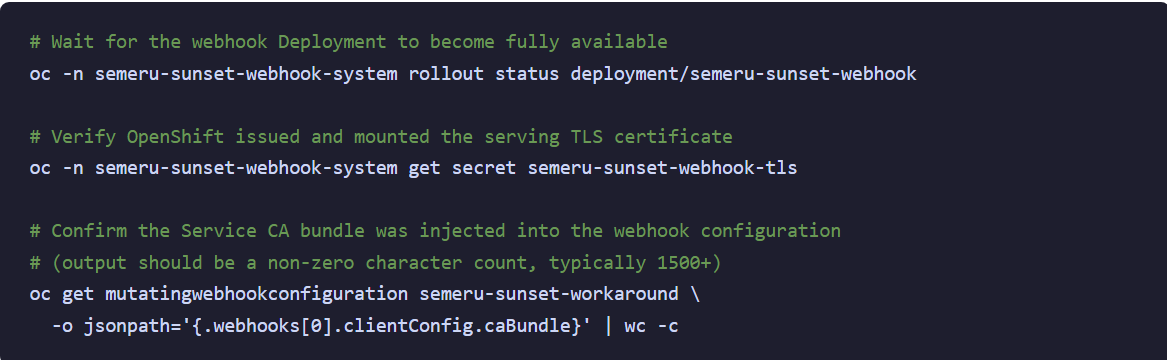
Step 2 - Verify the Webhook is Ready
Wait for the Deployment rollout to complete before labelling any namespaces. If the webhook pods are not running when a namespace is labelled, Pod CREATE events in that namespace may be delayed or fail.
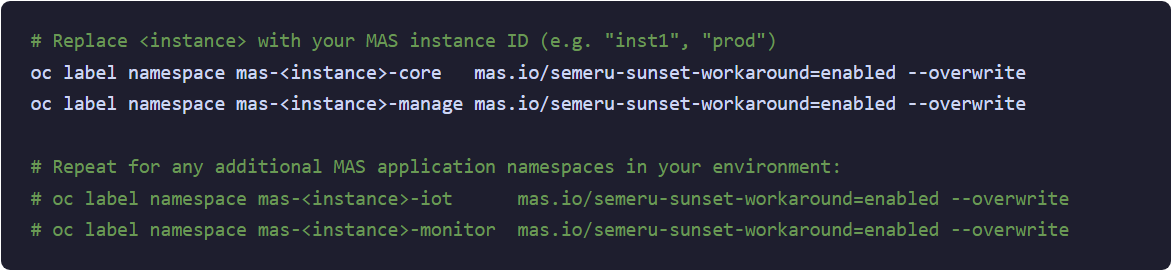
Step 3 - Opt In Target Namespaces
Label each MAS namespace that contains affected workloads. The webhook only intercepts Pod CREATE events in namespaces that carry this label — all other namespaces are untouched.
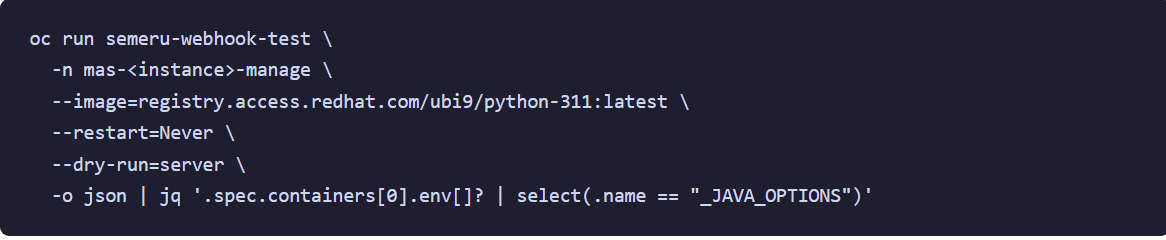
Step 4 - Validate with a Dry-Run Test
Before cycling any production pods, perform a non-invasive server-side dry run to confirm the webhook is injecting the expected environment variable:

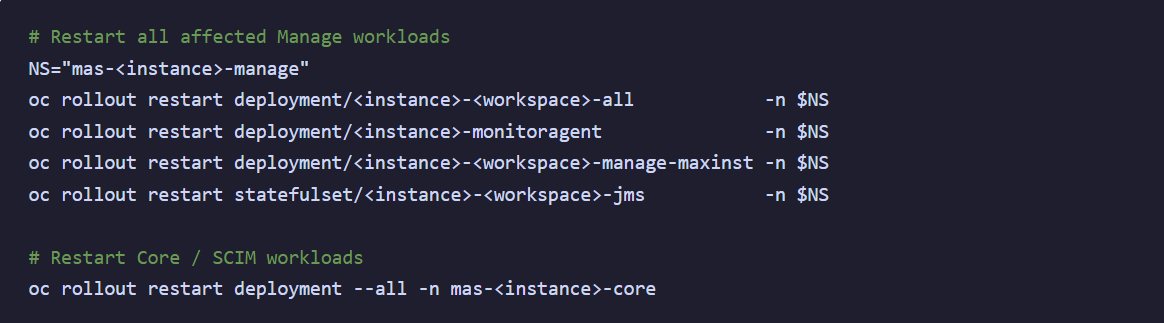
Step 5 - Restart Affected Pods
For existing pods that are already failing or stuck, trigger a rollout restart so they are recreated and intercepted by the webhook:
Part 2 — Suite License Service (SLS)
Step 6 - Deploy the SLS FIPS 1402 Webhook
Apply the SLS-specific webhook. This creates the semeru-sls-1402-workaround-system namespace, a second dedicated webhook Deployment, and a tightly scoped MutatingWebhookConfiguration that only fires for the sls-api-licensing pod in the ibm-sls namespace.

Step 7 - Verify the SLS Webhook is Ready
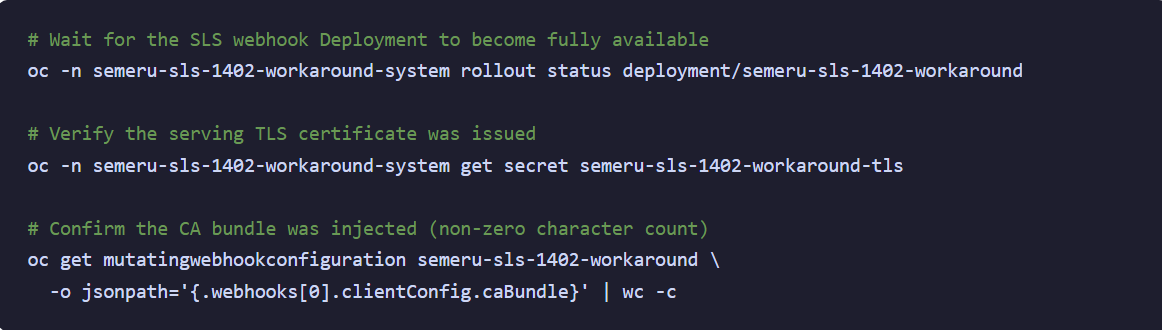
Step 8 - Opt In the SLS Namespace

Step 9 - Restart the SLS api-licensing Pod
Delete the current sls-api-licensing pod so that when it is recreated by its controller, the webhook intercepts the CREATE event and injects the initContainer profile override:

Monitor the pod restart and confirm it reaches Running status. The webhook will have injected a prepare-semeru-1402-profile initContainer that runs first, patches the FIPS profile properties file, and makes it available to the main api-licensing container via a volume mount before the JVM attempts to start.

How the SLS Profile Override Works
The SLS webhook injects an initContainer that runs the same image as the api-licensing container. The initContainer executes a shell script that:
- Reads the existing IBM MAS FIPS 140-2 profile from
/opt/ibm/java/conf/security/mas-fips-140-2.propertiesinside the image. - Validates that the expected
extendsrelationship andsunsetDatevalues are exactly as expected — if anything has changed (e.g. after an SLS upgrade), the initContainer exits with an error rather than applying a potentially incorrect patch. - Copies the file to an
emptyDirshared volume and appends a single line:RestrictedSecurity.NSS.MAS-FIPS-140-2.desc.sunsetDate =(an empty value, which clears the inherited sunset date). - The patched file is then mounted over the original profile path in the
api-licensingcontainer using asubPathvolume mount.
The SLS webhook targets a specific image digest (icr.io/cpopen/ibm-sls/api-licensing@sha256:f82a8c97f42e…). If the api-licensing container image changes — for example, after an SLS upgrade — the webhook detects the image mismatch, logs a warning, and allows the pod to start unmodified. This means the workaround will automatically stop applying itself once SLS is upgraded to a fixed version.
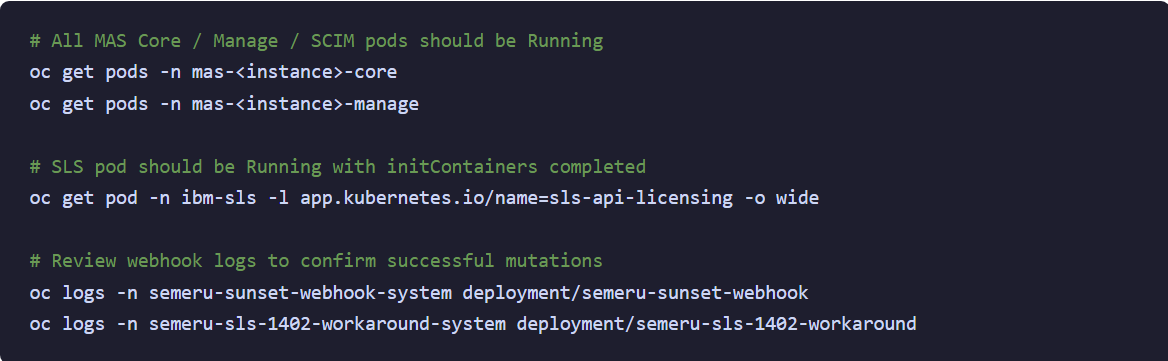
Verification Summary
After completing all steps, verify the end state across your cluster:
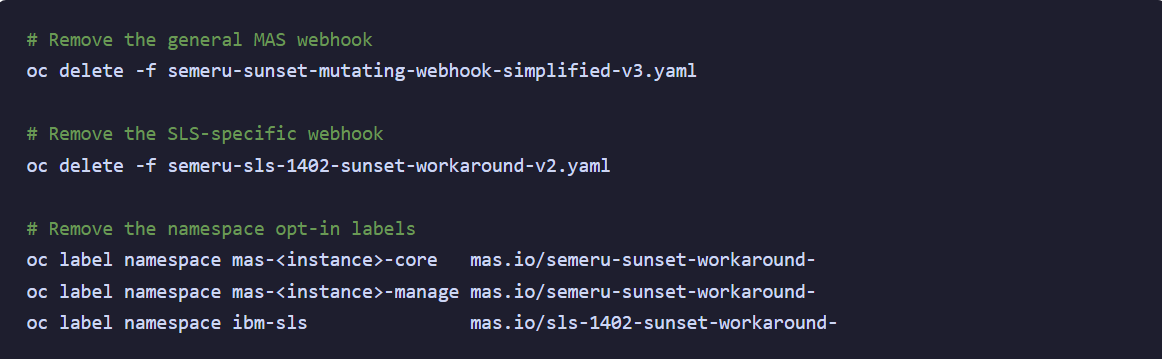
Removing the Workaround
Once the environment has been upgraded to a MAS/SLS catalog version that resolves the FIPS 140-2 sunset issue (catalog 260918 or later), remove the webhooks and their supporting namespace labels cleanly:
YAML Manifests
The two complete YAML manifests are reproduced below for reference. Each is fully self-contained and can be applied as-is from a single oc apply -f command.
semeru-sunset-mutating-webhook-simplified-v3.yaml
Injects _JAVA_OPTIONS into all containers and initContainers on Pod CREATE events in opted-in namespaces. Uses failurePolicy: Ignore — if the webhook is unavailable, pods are allowed to start without mutation (fail-open).

semeru-sls-1402-sunset-workaround-v2.yaml
Injects an initContainer into the sls-api-licensing pod to patch its FIPS profile properties file. Uses failurePolicy: Fail — SLS pods are blocked from starting if the webhook is unavailable, protecting against starting with an expired profile.

📝 IBM Support Confirmation
IBM Support (case TS023067931) confirmed that using -Dsemeru.restrictedsecurity.ignoresunsetexpiration=true is a supported interim workaround. It does not place the environment in an unsupported state while the upgrade to the emergency catalog release is being planned and executed. The permanent resolution is to upgrade to MAS catalog version 260918 or later.
-1.png?width=461&height=118&name=Untitled%20design%20(26)-1.png)