
.gif)

IBM Maximo User Groups | asset management solution | IBM SmartCloud Control Desk | IBM Maximo Resources | RedHat | coding | IBM Maximo Application Suite | offline OpenShift cluster
We are continuing our series of Blog Entries to cover some MAS deployment scenarios either left out or not appropriately covered on the IBM Ansible scripts. We are going to also discuss considerations and tips and hints around these deployments. This time we are installing an offline OpenShift Cluster and Mirroring the required Image Registries. This is Part 2 of 3, to cover actual mirroring, both direct and 2-phase.
RedHat OpenShift installation
To install RedHat OpenShift, given that we are using VMware ESXi as the virtualization platform and the Agent Based Installer. As we have ESXi and therefore the VSphere API is not available to use VSphere as an IPI method, we are going to generate an ISO file from the Agent Based Installer that we can upload and use to boot the OpenShift SNO Virtual Machine.
We have selected that approach vs. the Assisted Installer route which also generates an ISO file and now supports disconnected installs, because some customers of ours would like to install FIPS compliant clusters, which is not currently possible with the online Assisted Installer.
We followed the instructions on this page https://docs.redhat.com/en/documentation/openshift_container_platform/4.20/html/installing_an_on-premise_cluster_with_the_agent-based_installer/preparing-to-install-with-agent-based-installer.
To start doing so, in the External Internet Connected Workstation, we manually created a couple of files needed for the ISO generation (we will transfer the generated ISO to the Internal/Disconnected Workstation as this way is easier than trying to generate it on the disconnected side), those were hand-crafted (as there is no appropriate wizard that generates them) and should have appropriate comments so they can be modified for each case. As usual, any values that should be considered for updates are highlighted in yellow:
For the “install-config.yaml” file (remove the “fips:true” line for non-FIPS enabled installs, this line should only be used when the workstation has been installed in FIPS mode and if we want to have the RedHat OCP Cluster installed in FIPS mode):
apiVersion: v1
baseDomain: mas.interloc.cloud # Matches your target API subdomain string
fips: true
compute:
- architecture: amd64
hyperthreading: Enabled
name: worker
replicas: 0 # SNO
controlPlane:
architecture: amd64
hyperthreading: Enabled
name: master
replicas: 1 # SNO
metadata:
name: local02
networking:
networkType: OVNKubernetes
machineNetwork:
- cidr: 192.168.8.0/24 # This needs to be your node subnet
clusterNetwork:
- cidr: 10.128.0.0/14 # default
hostPrefix: 23
serviceNetwork:
- 172.30.0.0/16 # default
platform:
none: {} # This tells OCP not to look for AWS, vSphere IPI, or BMC controllers, but if not none, more information will be required (like VCenter/VSphere information or IPMI controllers, etc.)
pullSecret: '{"auths":{"dcr.local02.mas.interloc.cloud:5000":{"auth":"cmVnaXN0cnk6cmVnaXN0cnktcGFzc3dvcmQ="}}}'
additionalTrustBundle: |
-----BEGIN CERTIFICATE-----
MIIFZjCCA06gAwIBAgIUBt8Ui6ewnM7kEdIxsTwBdABhoc4wDQYJKoZIhvcNAQELBQAwKTEnMCUGA1UEAwweZGNyLmxvY2FsMDIubWFzLmludGVybG9jLmNsb3VkMB4XDTI2MDUxOTIzNDkxNVoXDTQ2MDUxNDIzNDkxNVowKTEnMCUGA1UEAwweZGNyLmxvY2FsMDIubWFzLmludGVybG9jLmNsb3VkMIICIjANBgkqhkiG9w0BAQEFAAOCAg8AMIICCgKCAgEArcddBvKtVWbKisxWrQqkFtcmLcJny5FsjaYj6Oc8VJRT559m9X/Vj9/EFudYggrv5OU4Y4Lk5WdVcTB4van/UamNgRLJEc9eefs3NuJd/vDS4T308VBp0Hhwb0TA07I6dBlqaikF5EqDhGeviBmEcDz4npp9lM+bUlArydq54kGKHknWqbABJRfORCr5TXL84JnsbM3j1lpYU1BmQdRS6wntuvHQdWOosaSSDOquj8m8oo5W8IERO1G08nAYwg5kTmSBjf3bscPdgCSnI4VZN2B7F/Rp9pAeya9dLb4AN4q2MTy+VKuTRsuRJLgzXTcBLUnhUG3+yflsy/IuCNlB6dnDvjwRe+lU1FHZD1WgUqO5qqFiLa7mVXkXxIvJBGKWPpVP5U5JAqw3E2ZDwdNcL8j4rvS4az1oE9inUQgFVJSwP3G18Fs7/CnBpCdNTystT4rBvMwXHV8hASQXMizmryTFZTnLc5s/1tq/fTUZ131MsasJQJf5btqA6ccAGk1GZ8vB0LHSUUtapnbtJCIeqFT2JtkC7O35HY8ZnieuLwcfKtWtTuLWue2o+qAfgTXKQOfGuA1WSHdcYDG4JrU4aV6D1BY2AK/5HaJgCdz4iKbzUfKU9jHd81VJv3O1p9saubFXRQA/QDRUj+cBcKA2cTwr5rhEkG3IybXUwuO0YS8CAwEAAaOBhTCBgjAdBgNVHQ4EFgQU1+HywV/2Tsod6ghdTaA7jchXuH4wHwYDVR0jBBgwFoAU1+HywV/2Tsod6ghdTaA7jchXuH4wDwYDVR0TAQH/BAUwAwEB/zAvBgNVHREEKDAmgh5kY3IubG9jYWwwMi5tYXMuaW50ZXJsb2MuY2xvdWSHBMCoCIUwDQYJKoZIhvcNAQELBQADggIBAGaqPEgPIL4xu8cUtSsbnV2McRR+J8UAmEgEkkVJMEyd0qXS/14MaXUKua6vIEM+fuEo19BtF1qbNb5qGC7mFKnIGxZaYNO1NhLNtc1d++RbXwZ5qHjysscAkj2p6SJksujpjddEaVP9EP3HZiCtGK+/cSVQSGe1diXTsD9PaJ//q8t8Di5wSRdZS/k6WU26yGQJeNbCw5za4BT5CdCNcDgiBHtL+nKD9YJNrImCQ7aTZ2GJiDwmUfKrdb9unAkDA6abJKsfayzlGoN2KQk93iBX2hsucYj4wTY+z51g7aYoo9ahk6aXWYcJz+H4L9Xcy0XksSLk5vnFiFgJAmNF8Nk9RlP0njK1j2f8qLSsM83q9KpEVAAsGOWwD3bsYD8mhnRoDyhsED9kuKrYiihc+zIVij54vvSjoy0mV2wI4p61aain+UfRANJdLG+y9LfrVfN7XIExtzpOczlgf1LYBKDGwcrgrEN+h9U7mD4eXc0fSisPO8e450QGlv2LPnzWa/4dz+kt/22Xk7H+3zsD8vZGhEBWvFVAekThppkxc8Qlwkzoe60Urvy1HOeHXEH4pfrlemLsPmhnKv5OPoFbbLla9TZdr7QeCMhjfkqFnBJHqTKgK/5VlRw4tHMAYt65oZH7CxGatE8YbwA+zN9qWW6lzxZ9aGEi3uuyl6j3THsL
-----END CERTIFICATE-----
sshKey: 'ssh-rsa AAAAB3NzaC1yc2EAAAADAQABAAABAQD5qwhtSO5UlkfUbXXq3yUZPtaKSNANJS2PDaratbMrgrAzF1TAm+nU9w+hFKVmtME0kZNwKXsnCi3gChNEAaF5Y+Do4ny+f0kj1TmQCbFTEpXmXF9aAfqKh814lzCYazWxLXS55mrzAgDoPX9yBQOY6jUZNF+gMEjpTSecqyPOFki2UYEB8UetV5OO0MsBR46VP/xUd8EJ+tA65tFSMFW4MrQYo6OIT3EjWoPpjMGHPhjC+DLo92E03VD+RkezbCSqofLiql9kOcOUAj3uSju0lKN75rWR96CqzyrXBRzBT/7dqxOMYfkosNbIysE7FowVg04ZvUL53EqyLy/f0w+7 imported-openssh-key' # Crucial for accessing the node via SSH for debugging
imageDigestSources:
- mirrors:
- dcr.local02.mas.interloc.cloud:5000/openshift/release
source: quay.io/openshift-release-dev/ocp-v4.0-art-dev
- mirrors:
- dcr.local02.mas.interloc.cloud:5000/openshift/release-images
source: quay.io/openshift-release-dev/ocp-release
For the “agent-config.yaml” file:
apiVersion: v1beta1
kind: AgentConfig
metadata:
name: local02-agent
rendezvousIP: 192.168.8.111 # The static IP for the SNO node
hosts:
- hostname: mw01.local02.mas.interloc.cloud
interfaces:
- name: ens192 # Match standard ESXi vNIC name naming patterns
macAddress: "02:0c:29:54:4b:a1" # Static MAC address assigned to your ESXi VM
networkConfig:
interfaces:
- name: ens192
type: ethernet
state: up
ipv4:
enabled: true
address:
- ip: 192.168.8.111 # The static IP for the SNO node
prefix-length: 24 # The subnet prefix length
dns-resolver:
config:
server:
- 192.168.254.254 # Internal DNS server that resolves api.local02...
routes:
config:
- destination: 0.0.0.0/0
next-hop-address: 192.168.8.1 # Default route for the subnet to access the DNS server above
next-hop-interface: ens192
We created those two files “install-config.yaml” and “agent-config.yaml” in our ~/MAS/openshift-install/local02/config folder, it is also a good idea to copy them into /mnt/images/transfer/openshift-install/local02/config, see below commands:
export CLUSTER_NAME="local02"
mkdir -p ~/MAS/openshift-install/${CLUSTER_NAME}/config
cd ~/MAS/openshift-install/${CLUSTER_NAME}/config
Create both files named “install-config.yaml” and “agent-config.yaml” and as per content above in the current folder. Then we copied those to the external USB disk (backed them up as the installer has the tendency to delete them after the install command execution is complete):
export LOCAL_TRANSFER_DIR="/mnt/images/transfer"
export CLUSTER_NAME="local02"
mkdir -p ${LOCAL_TRANSFER_DIR}/openshift-install/${CLUSTER_NAME}/config
cp -r ~/MAS/openshift-install/${CLUSTER_NAME}/config ${LOCAL_TRANSFER_DIR}/openshift-install/${CLUSTER_NAME}/
Next, we generated the ISO to boot up the VM with the commands:
export CLUSTER_NAME="local02"
cd ~/MAS/openshift-install/${CLUSTER_NAME}/config
openshift-install --dir ./ agent create image
Note: to use a more verbose output, we can use “openshift-install --log-level debug --dir ./ agent create image” instead.
For FIPS mode clusters, in addition to the “fips: true” line in the “install-config.yaml” file, we need to replace the command that generates the ISO above from “openshift-install” to use instead “openshift-install-fips”.
And we got the following output (notice we used the DEBUG log level as per above):
DEBUG OpenShift Installer 4.20.21
DEBUG Built from commit 13a5f6b91e1636b63bb0956c6fa49fab236e71c1
DEBUG Fetching Agent Installer ISO...
DEBUG Loading Agent Installer ISO...
DEBUG Loading Agent Workflow...
DEBUG Loading Agent Installer ClusterInfo...
DEBUG Loading Agent Workflow...
DEBUG Loading AddNodes Config...
DEBUG Loading Agent Installer Artifacts...
DEBUG Loading Agent Installer Ignition...
DEBUG Loading Agent Workflow...
DEBUG Loading Agent Installer ClusterInfo...
DEBUG Loading AddNodes Config...
DEBUG Loading Additional import cluster config...
DEBUG Loading Agent Workflow...
DEBUG Loading Agent Installer ClusterInfo...
DEBUG Loading Agent Manifests...
DEBUG Loading Agent PullSecret...
DEBUG Loading Agent Workflow...
DEBUG Loading Agent Installer ClusterInfo...
DEBUG Loading Install Config...
DEBUG Using internal constant for release image quay.io/openshift-release-dev/ocp-release@sha256:54c81ab130a264829c9a3434df1005074cc9b2edc8e31ead40ac94faf3debf72
DEBUG Release Image arch is: amd64
DEBUG Supported architecture amd64 found for the release image: quay.io/openshift-release-dev/ocp-release@sha256:54c81ab130a264829c9a3434df1005074cc9b2edc8e31ead40ac94faf3debf72
INFO Configuration has 1 master replicas, 0 arbiter replicas, and 0 worker replicas
DEBUG Using Install Config loaded from target directory
DEBUG Loading InfraEnv Config...
DEBUG Loading Agent Workflow...
DEBUG Loading Agent Installer ClusterInfo...
DEBUG Loading Install Config...
DEBUG Loading Agent Config...
DEBUG Using Agent Config loaded from target directory
DEBUG Loading NMState Config...
DEBUG Loading Agent Workflow...
DEBUG Loading Agent Installer ClusterInfo...
DEBUG Loading Agent Hosts...
DEBUG Loading Agent Workflow...
DEBUG Loading AddNodes Config...
DEBUG Loading Install Config...
DEBUG Loading Agent Config...
DEBUG Loading Install Config...
DEBUG Loading AgentClusterInstall Config...
DEBUG Loading Agent Workflow...
DEBUG Loading Install Config...
DEBUG Loading Agent Hosts...
DEBUG Loading Agent Config...
DEBUG Loading ClusterDeployment Config...
DEBUG Loading Agent Workflow...
DEBUG Loading Install Config...
DEBUG Loading ClusterImageSet Config...
DEBUG Loading Agent Workflow...
DEBUG Loading Agent Installer ClusterInfo...
DEBUG Loading Release Image Pull Spec...
DEBUG Loading Install Config...
DEBUG Loading Extra Manifests...
DEBUG Loading Certificate (kube-apiserver-lb-signer)...
DEBUG Loading Certificate (kube-apiserver-localhost-signer)...
DEBUG Loading Certificate (kube-apiserver-service-network-signer)...
DEBUG Loading Certificate (admin-kubeconfig-signer)...
DEBUG Loading Kubeadmin Password...
DEBUG Loading Agent Config...
DEBUG Loading Agent Hosts...
DEBUG Loading Mirror Registries Config...
DEBUG Loading Agent Workflow...
DEBUG Loading Agent Installer ClusterInfo...
DEBUG Loading Install Config...
DEBUG Loading Release Image Pull Spec...
DEBUG Using internal constant for release image quay.io/openshift-release-dev/ocp-release@sha256:54c81ab130a264829c9a3434df1005074cc9b2edc8e31ead40ac94faf3debf72
DEBUG Loading Mirror Registries Certificate File...
DEBUG Loading Agent Workflow...
DEBUG Loading Agent Installer ClusterInfo...
DEBUG Loading Install Config...
DEBUG Loading Agent Installer API Auth Config...
DEBUG Loading Agent Workflow...
DEBUG Loading AddNodes Config...
DEBUG Loading Agent Installer InfraEnv ID...
DEBUG Loading Agent ISO/PXE files Kernel Arguments...
DEBUG Loading Agent Workflow...
DEBUG Loading Agent Installer ClusterInfo...
DEBUG Loading AgentClusterInstall Config...
DEBUG Loading BaseIso Image...
DEBUG Loading Agent Workflow...
DEBUG Loading Agent Installer ClusterInfo...
DEBUG Loading Agent Manifests...
DEBUG Loading Install Config...
DEBUG Loading Mirror Registries Config...
DEBUG Loading Agent Manifests...
DEBUG Loading AgentClusterInstall Config...
DEBUG Loading Mirror Registries Config...
DEBUG Loading Agent Config...
DEBUG Loading Agent Workflow...
DEBUG Loading Agent Installer ClusterInfo...
DEBUG Loading Agent Manifests...
DEBUG Loading BaseIso Image...
DEBUG Loading Agent Installer API Auth Config...
DEBUG Fetching Agent Workflow...
DEBUG Generating Agent Workflow...
DEBUG Fetching Agent Installer ClusterInfo...
DEBUG Fetching Agent Workflow...
DEBUG Reusing previously-fetched Agent Workflow
DEBUG Fetching AddNodes Config...
DEBUG Generating AddNodes Config...
DEBUG Generating Agent Installer ClusterInfo...
DEBUG Fetching Agent Installer Artifacts...
DEBUG Fetching Agent Installer Ignition...
DEBUG Fetching Agent Workflow...
DEBUG Reusing previously-fetched Agent Workflow
DEBUG Fetching Agent Installer ClusterInfo...
DEBUG Reusing previously-fetched Agent Installer ClusterInfo
DEBUG Fetching AddNodes Config...
DEBUG Reusing previously-fetched AddNodes Config
DEBUG Fetching Additional import cluster config...
DEBUG Fetching Agent Workflow...
DEBUG Reusing previously-fetched Agent Workflow
DEBUG Fetching Agent Installer ClusterInfo...
DEBUG Reusing previously-fetched Agent Installer ClusterInfo
DEBUG Generating Additional import cluster config...
DEBUG Fetching Agent Manifests...
DEBUG Fetching Agent PullSecret...
DEBUG Fetching Agent Workflow...
DEBUG Reusing previously-fetched Agent Workflow
DEBUG Fetching Agent Installer ClusterInfo...
DEBUG Reusing previously-fetched Agent Installer ClusterInfo
DEBUG Fetching Install Config...
DEBUG Reusing previously-fetched Install Config
DEBUG Generating Agent PullSecret...
DEBUG Fetching InfraEnv Config...
DEBUG Fetching Agent Workflow...
DEBUG Reusing previously-fetched Agent Workflow
DEBUG Fetching Agent Installer ClusterInfo...
DEBUG Reusing previously-fetched Agent Installer ClusterInfo
DEBUG Fetching Install Config...
DEBUG Reusing previously-fetched Install Config
DEBUG Fetching Agent Config...
DEBUG Reusing previously-fetched Agent Config
DEBUG Generating InfraEnv Config...
DEBUG Fetching NMState Config...
DEBUG Fetching Agent Workflow...
DEBUG Reusing previously-fetched Agent Workflow
DEBUG Fetching Agent Installer ClusterInfo...
DEBUG Reusing previously-fetched Agent Installer ClusterInfo
DEBUG Fetching Agent Hosts...
DEBUG Fetching Agent Workflow...
DEBUG Reusing previously-fetched Agent Workflow
DEBUG Fetching AddNodes Config...
DEBUG Reusing previously-fetched AddNodes Config
DEBUG Fetching Install Config...
DEBUG Reusing previously-fetched Install Config
DEBUG Fetching Agent Config...
DEBUG Reusing previously-fetched Agent Config
DEBUG Generating Agent Hosts...
DEBUG Using hosts from agent-config.yaml
DEBUG Fetching Install Config...
DEBUG Reusing previously-fetched Install Config
DEBUG Generating NMState Config...
DEBUG adding MAC interface map to host static network config - Name: ens192 MacAddress:02:0c:29:54:4b:a1
DEBUG Fetching AgentClusterInstall Config...
DEBUG Fetching Agent Workflow...
DEBUG Reusing previously-fetched Agent Workflow
DEBUG Fetching Install Config...
DEBUG Reusing previously-fetched Install Config
DEBUG Fetching Agent Hosts...
DEBUG Reusing previously-fetched Agent Hosts
DEBUG Fetching Agent Config...
DEBUG Reusing previously-fetched Agent Config
DEBUG Generating AgentClusterInstall Config...
DEBUG Setting UserManagedNetworking to true for None platform
DEBUG Fetching ClusterDeployment Config...
DEBUG Fetching Agent Workflow...
DEBUG Reusing previously-fetched Agent Workflow
DEBUG Fetching Install Config...
DEBUG Reusing previously-fetched Install Config
DEBUG Generating ClusterDeployment Config...
DEBUG Fetching ClusterImageSet Config...
DEBUG Fetching Agent Workflow...
DEBUG Reusing previously-fetched Agent Workflow
DEBUG Fetching Agent Installer ClusterInfo...
DEBUG Reusing previously-fetched Agent Installer ClusterInfo
DEBUG Fetching Release Image Pull Spec...
DEBUG Generating Release Image Pull Spec...
DEBUG Using internal constant for release image quay.io/openshift-release-dev/ocp-release@sha256:54c81ab130a264829c9a3434df1005074cc9b2edc8e31ead40ac94faf3debf72
DEBUG Fetching Install Config...
DEBUG Reusing previously-fetched Install Config
DEBUG Generating ClusterImageSet Config...
DEBUG Using internal constant for release image quay.io/openshift-release-dev/ocp-release@sha256:54c81ab130a264829c9a3434df1005074cc9b2edc8e31ead40ac94faf3debf72
DEBUG Generating Agent Manifests...
DEBUG Fetching Extra Manifests...
DEBUG Generating Extra Manifests...
DEBUG Fetching Certificate (kube-apiserver-lb-signer)...
DEBUG Generating Certificate (kube-apiserver-lb-signer)...
DEBUG Fetching Certificate (kube-apiserver-localhost-signer)...
DEBUG Generating Certificate (kube-apiserver-localhost-signer)...
DEBUG Fetching Certificate (kube-apiserver-service-network-signer)...
DEBUG Generating Certificate (kube-apiserver-service-network-signer)...
DEBUG Fetching Certificate (admin-kubeconfig-signer)...
DEBUG Generating Certificate (admin-kubeconfig-signer)...
DEBUG Fetching Kubeadmin Password...
DEBUG Generating Kubeadmin Password...
DEBUG Fetching Agent Config...
DEBUG Reusing previously-fetched Agent Config
DEBUG Fetching Agent Hosts...
DEBUG Reusing previously-fetched Agent Hosts
DEBUG Fetching Mirror Registries Config...
DEBUG Fetching Agent Workflow...
DEBUG Reusing previously-fetched Agent Workflow
DEBUG Fetching Agent Installer ClusterInfo...
DEBUG Reusing previously-fetched Agent Installer ClusterInfo
DEBUG Fetching Install Config...
DEBUG Reusing previously-fetched Install Config
DEBUG Fetching Release Image Pull Spec...
DEBUG Reusing previously-fetched Release Image Pull Spec
DEBUG Generating Mirror Registries Config...
DEBUG Fetching Mirror Registries Certificate File...
DEBUG Fetching Agent Workflow...
DEBUG Reusing previously-fetched Agent Workflow
DEBUG Fetching Agent Installer ClusterInfo...
DEBUG Reusing previously-fetched Agent Installer ClusterInfo
DEBUG Fetching Install Config...
DEBUG Reusing previously-fetched Install Config
DEBUG Generating Mirror Registries Certificate File...
DEBUG Fetching Agent Installer API Auth Config...
DEBUG Fetching Agent Workflow...
DEBUG Reusing previously-fetched Agent Workflow
DEBUG Fetching AddNodes Config...
DEBUG Reusing previously-fetched AddNodes Config
DEBUG Generating Agent Installer API Auth Config...
DEBUG Fetching Agent Installer InfraEnv ID...
DEBUG Generating Agent Installer InfraEnv ID...
DEBUG Generating Agent Installer Ignition...
DEBUG RendezvousIP from the AgentConfig 192.168.8.111
INFO The rendezvous host IP (node0 IP) is 192.168.8.111
DEBUG Release Image arch is: amd64
DEBUG Found Release Image Architecture: x86_64
DEBUG Generated random infra-env id 08b2f62f-97af-4f98-8aa7-73444b0c2722
DEBUG Fetching Agent ISO/PXE files Kernel Arguments...
DEBUG Fetching Agent Workflow...
DEBUG Reusing previously-fetched Agent Workflow
DEBUG Fetching Agent Installer ClusterInfo...
DEBUG Reusing previously-fetched Agent Installer ClusterInfo
DEBUG Fetching AgentClusterInstall Config...
DEBUG Reusing previously-fetched AgentClusterInstall Config
DEBUG Generating Agent ISO/PXE files Kernel Arguments...
DEBUG Fetching BaseIso Image...
DEBUG Fetching Agent Workflow...
DEBUG Reusing previously-fetched Agent Workflow
DEBUG Fetching Agent Installer ClusterInfo...
DEBUG Reusing previously-fetched Agent Installer ClusterInfo
DEBUG Fetching Agent Manifests...
DEBUG Reusing previously-fetched Agent Manifests
DEBUG Fetching Install Config...
DEBUG Reusing previously-fetched Install Config
DEBUG Fetching Mirror Registries Config...
DEBUG Reusing previously-fetched Mirror Registries Config
DEBUG Generating BaseIso Image...
INFO Extracting base ISO from release payload
DEBUG Using mirror configuration
DEBUG Fetching image from OCP release ([oc adm release info --image-for=machine-os-images --filter-by-os=linux/amd64 --insecure=true --icsp-file=/tmp/icsp-file600137618 quay.io/openshift-release-dev/ocp-release@sha256:54c81ab130a264829c9a3434df1005074cc9b2edc8e31ead40ac94faf3debf72])
DEBUG The file was found in cache: /root/.cache/agent/image_cache/coreos-x86_64.iso. Reusing...
INFO Verifying cached file
DEBUG Found matching hash in installer metadata
INFO Using cached Base ISO /root/.cache/agent/image_cache/coreos-x86_64.iso
DEBUG Checking release payload base ISO version
DEBUG Using mirror configuration
DEBUG Fetching image from OCP release ([oc adm release info --image-for=machine-os-images --filter-by-os=linux/amd64 --insecure=true --icsp-file=/tmp/icsp-file2799697713 quay.io/openshift-release-dev/ocp-release@sha256:54c81ab130a264829c9a3434df1005074cc9b2edc8e31ead40ac94faf3debf72])
DEBUG Removed file /root/.cache/agent/files_cache/coreos-stream.json
DEBUG extracting /coreos/coreos-stream.json to /root/.cache/agent/files_cache, [oc image extract --path=/coreos/coreos-stream.json:/root/.cache/agent/files_cache --filter-by-os=linux/amd64 --insecure=true --confirm --icsp-file=/tmp/icsp-file67294721 quay.io/openshift-release-dev/ocp-v4.0-art-dev@sha256:30a4c9bdef8804b1b0b89b25f287e381d6811fd86d23708c66d781f47a03e8a6]
DEBUG Extracted base ISO image /root/.cache/agent/image_cache/coreos-x86_64.iso from release payload
DEBUG Using base ISO image /root/.cache/agent/image_cache/coreos-x86_64.iso
DEBUG Fetching Agent Manifests...
DEBUG Reusing previously-fetched Agent Manifests
DEBUG Fetching AgentClusterInstall Config...
DEBUG Reusing previously-fetched AgentClusterInstall Config
DEBUG Fetching Mirror Registries Config...
DEBUG Reusing previously-fetched Mirror Registries Config
DEBUG Fetching Agent Config...
DEBUG Reusing previously-fetched Agent Config
DEBUG Fetching Agent Workflow...
DEBUG Reusing previously-fetched Agent Workflow
DEBUG Fetching Agent Installer ClusterInfo...
DEBUG Reusing previously-fetched Agent Installer ClusterInfo
DEBUG Generating Agent Installer Artifacts...
DEBUG Using mirror configuration
DEBUG Fetching image from OCP release ([oc adm release info --image-for=agent-installer-utils --filter-by-os=linux/amd64 --insecure=true --icsp-file=/tmp/icsp-file1253282714 quay.io/openshift-release-dev/ocp-release@sha256:54c81ab130a264829c9a3434df1005074cc9b2edc8e31ead40ac94faf3debf72])
DEBUG Removed file /root/.cache/agent/files_cache/agent-tui
DEBUG extracting /usr/bin/agent-tui to /root/.cache/agent/files_cache, [oc image extract --path=/usr/bin/agent-tui:/root/.cache/agent/files_cache --filter-by-os=linux/amd64 --insecure=true --confirm --icsp-file=/tmp/icsp-file1179792602 quay.io/openshift-release-dev/ocp-v4.0-art-dev@sha256:c116054a7800425e17591d0c92629c1198b65cadca3ac796716ec8fcd3d7c759]
DEBUG Using mirror configuration
DEBUG Fetching image from OCP release ([oc adm release info --image-for=agent-installer-utils --filter-by-os=linux/amd64 --insecure=true --icsp-file=/tmp/icsp-file3701758838 quay.io/openshift-release-dev/ocp-release@sha256:54c81ab130a264829c9a3434df1005074cc9b2edc8e31ead40ac94faf3debf72])
DEBUG Removed file /root/.cache/agent/files_cache/libnmstate.so.2
DEBUG Removed file /root/.cache/agent/files_cache/libnmstate.so.2.2.59
DEBUG extracting /usr/lib64/libnmstate.so.* to /root/.cache/agent/files_cache, [oc image extract --path=/usr/lib64/libnmstate.so.*:/root/.cache/agent/files_cache --filter-by-os=linux/amd64 --insecure=true --confirm --icsp-file=/tmp/icsp-file3435906890 quay.io/openshift-release-dev/ocp-v4.0-art-dev@sha256:c116054a7800425e17591d0c92629c1198b65cadca3ac796716ec8fcd3d7c759]
DEBUG initDisk(): start
DEBUG initDisk(): regular file
DEBUG Fetching Agent Manifests...
DEBUG Reusing previously-fetched Agent Manifests
DEBUG Fetching BaseIso Image...
DEBUG Reusing previously-fetched BaseIso Image
DEBUG Fetching Agent Installer API Auth Config...
DEBUG Reusing previously-fetched Agent Installer API Auth Config
DEBUG Generating Agent Installer ISO...
DEBUG initDisk(): start
DEBUG initDisk(): regular file
DEBUG initDisk(): start
DEBUG initDisk(): regular file
DEBUG initDisk(): start
DEBUG initDisk(): regular file
DEBUG initDisk(): start
DEBUG initDisk(): regular file
INFO Consuming Install Config from target directory
DEBUG Purging asset "Install Config" from disk
INFO Consuming Agent Config from target directory
DEBUG Purging asset "Agent Config" from disk
DEBUG initDisk(): start
DEBUG initDisk(): regular file
INFO Generated ISO at agent.x86_64.iso.
DEBUG Fetching Kubeconfig Admin Client...
DEBUG Loading Kubeconfig Admin Client...
DEBUG Loading Certificate (admin-kubeconfig-client)...
DEBUG Loading Certificate (admin-kubeconfig-signer)...
DEBUG Loading Certificate (kube-apiserver-complete-server-ca-bundle)...
DEBUG Loading Certificate (kube-apiserver-localhost-ca-bundle)...
DEBUG Loading Certificate (kube-apiserver-localhost-signer)...
DEBUG Loading Certificate (kube-apiserver-service-network-ca-bundle)...
DEBUG Loading Certificate (kube-apiserver-service-network-signer)...
DEBUG Loading Certificate (kube-apiserver-lb-ca-bundle)...
DEBUG Loading Certificate (kube-apiserver-lb-signer)...
DEBUG Loading ClusterDeployment Config...
DEBUG Fetching Certificate (admin-kubeconfig-client)...
DEBUG Fetching Certificate (admin-kubeconfig-signer)...
DEBUG Reusing previously-fetched Certificate (admin-kubeconfig-signer)
DEBUG Generating Certificate (admin-kubeconfig-client)...
DEBUG Fetching Certificate (kube-apiserver-complete-server-ca-bundle)...
DEBUG Fetching Certificate (kube-apiserver-localhost-ca-bundle)...
DEBUG Fetching Certificate (kube-apiserver-localhost-signer)...
DEBUG Reusing previously-fetched Certificate (kube-apiserver-localhost-signer)
DEBUG Generating Certificate (kube-apiserver-localhost-ca-bundle)...
DEBUG Fetching Certificate (kube-apiserver-service-network-ca-bundle)...
DEBUG Fetching Certificate (kube-apiserver-service-network-signer)...
DEBUG Reusing previously-fetched Certificate (kube-apiserver-service-network-signer)
DEBUG Generating Certificate (kube-apiserver-service-network-ca-bundle)...
DEBUG Fetching Certificate (kube-apiserver-lb-ca-bundle)...
DEBUG Fetching Certificate (kube-apiserver-lb-signer)...
DEBUG Reusing previously-fetched Certificate (kube-apiserver-lb-signer)
DEBUG Generating Certificate (kube-apiserver-lb-ca-bundle)...
DEBUG Generating Certificate (kube-apiserver-complete-server-ca-bundle)...
DEBUG Fetching ClusterDeployment Config...
DEBUG Reusing previously-fetched ClusterDeployment Config
DEBUG Generating Kubeconfig Admin Client...
DEBUG Fetching Kubeadmin Password...
DEBUG Reusing previously-fetched Kubeadmin Password
Note: The SNO VM was turned off at that time (at 192.168.8.111).
Next, we transferred the generated folder structure (including the ISO) into the removable hard drive:
export LOCAL_TRANSFER_DIR="/mnt/images/transfer"
export CLUSTER_NAME="local02"
mkdir -p ${LOCAL_TRANSFER_DIR}/openshift-install/${CLUSTER_NAME}/config
cp -r ~/MAS/openshift-install/${CLUSTER_NAME}/config ${LOCAL_TRANSFER_DIR}/openshift-install/${CLUSTER_NAME}/
The folder structure is as follows (on the removable hard drive):
-rw-r--r--. 1 root root 996 May 14 14:26 agent-config.yaml
-rw-r--r--. 1 root root 1379311616 May 14 16:05 agent.x86_64.iso
drwxr-x---. 2 root root 50 May 14 16:05 auth
-rw-r-----. 1 root root 23 May 14 15:57 auth/kubeadmin-password
-rw-r-----. 1 root root 8962 May 14 15:57 auth/kubeconfig
-rw-r--r--. 1 root root 3425 May 14 15:51 install-config.yaml
-rw-r--r--. 1 root root 64757 May 14 16:05 .openshift_install.log
-rw-r-----. 1 root root 458883 May 14 16:05 .openshift_install_state.json
-rw-r--r--. 1 root root 13 May 14 16:05 rendezvousIP
Note the “auth/kubeconfig” and “auth/kubeadmin-password” files as well as the “agent.x86_64.iso” which we are going to use to boot the SNO VM in ESXi.
After that, in our case, we just blocked all Internet access from the subnet that contains both the “Internal Workstation” (is the same for our lab) as well as from the “SNO Node VM” as well. This step does not need to be done usually; it is just an additional validation “insurance” for our specific setup:
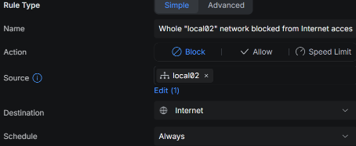

And for the configured DNS server:
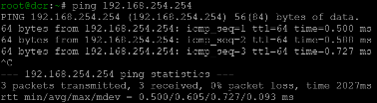
Next, we copied the generated “agent.x86_64.iso” file into our VMware VMFS datastore so we could mount it in the virtual DVD of the SNO node. Then booted the SNO node with the ISO mounted and watched it go in the console.
If needed, either for troubleshooting or curiosity, the activity can be seen using either or:
journalctl -u assisted-service.service -f
journalctl -u agent-tui -f
after connecting to the node via SSH using the private key associated to the public key that was configured in the “install-config.yaml” file.
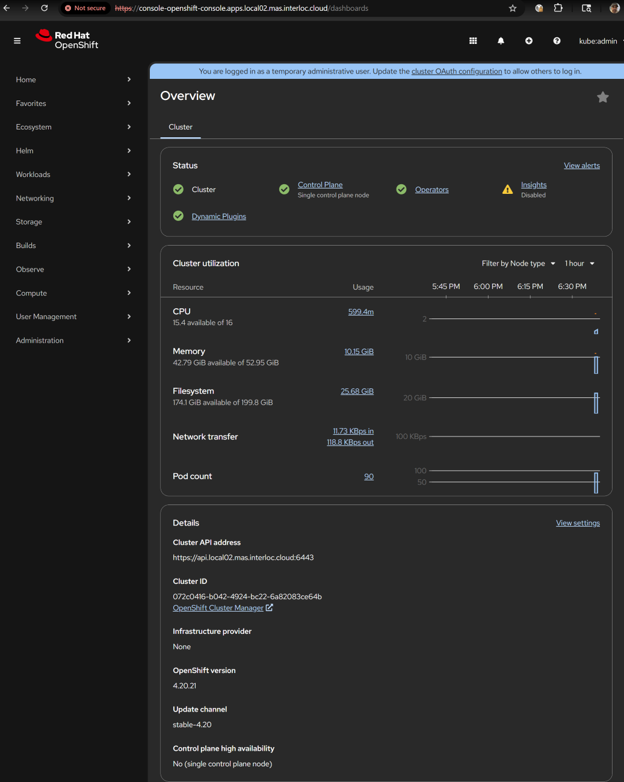
Once the installation has been completed (took like 1 hour), we could login to the Openshift Console (web) on our URL (note the “kubeadmin” credentials were provided in the “kubeadmin-password” file inside the “auth” folder:
Repository overrides to download the Images (for the MAS and dependencies) from the local repository
After the cluster has been installed, there should be several Pods that cannot be started as the images are trying to be downloaded from the Internet as expected and need the Image Sources to be reconfigured to point to the local repository instead, in our case, those pods were mostly related to the Catalogs, see below for a screenshot:
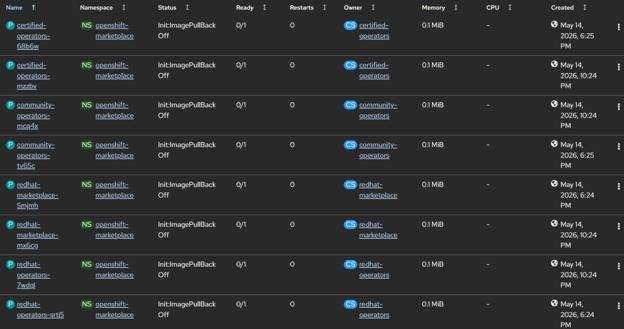
To configure the related ImageDigestMirrorSet(s) the following script can be run in the private workstation. Ensure to login into the cluster using “oc login” first.
export LOCAL_TRANSFER_DIR="/mnt/images/transfer"
export REGISTRY_HOST="dcr.local02.mas.interloc.cloud"
export REGISTRY_PORT="5000"
export REGISTRY_USERNAME="registry"
export REGISTRY_PASSWORD="registry-password"
# Note: ensure to login into cluster using "oc login" first
mkdir -p $LOCAL_TRANSFER_DIR/process/ibm-icsp
podman run -ti --rm --tls-verify=false \
-v $LOCAL_TRANSFER_DIR/process/ibm-icsp:/mnt/local:Z \
-v $LOCAL_TRANSFER_DIR/auth:/mnt/auth:Z \
-v ~/.kube:/root/.kube:Z \
$REGISTRY_HOST:$REGISTRY_PORT/ibmmas/cli:latest \
mas configure-airgap --no-confirm --setup-redhat-catalogs \
-H $REGISTRY_HOST -P $REGISTRY_PORT -u $REGISTRY_USERNAME -p $REGISTRY_PASSWORD \
--ca-file /mnt/auth/registry.crt
Wait for it to run and in our case, the final line was this:
PLAY RECAP ************************************************************************************************************************************************************************
localhost : ok=22 changed=5 unreachable=0 failed=0 skipped=4 rescued=0 ignored=1
To confirm, we can use the following commands:
oc get imagedigestmirrorset
Which should list the “ImageDigestMirrorSet”s configured, in our case:
NAME AGE
image-digest-mirror 3d20h
mas-ibm-catalog 4m56s
mas-redhat-catalogs 4m53s
The ones we wanted to confirm are “mas-ibm-catalog” and “mas-redhat-catalogs”. And for that we used:
oc get imagedigestmirrorset mas-redhat-catalogs -o yaml
oc get imagedigestmirrorset mas-ibm-catalog -o yaml
And got, for the “mas-redhat-catalogs”:
apiVersion: config.openshift.io/v1
kind: ImageDigestMirrorSet
metadata:
annotations:
kubectl.kubernetes.io/last-applied-configuration: '{"apiVersion":"config.openshift.io/v1","kind":"ImageDigestMirrorSet","metadata":{"annotations":{"mas.ibm.com/idmsRegistry":"dcr.local02.mas.interloc.cloud:5000","mas.ibm.com/idmsRegistryHost":"dcr.local02.mas.interloc.cloud","mas.ibm.com/idmsRegistryPort":"5000","mas.ibm.com/idmsRegistryPrefix":""},"labels":{"mas.ibm.com/idmsContent":"ibm"},"name":"mas-ibm-catalog"},"spec":{"imageDigestMirrors":[{"mirrorSourcePolicy":"NeverContactSource","mirrors":["dcr.local02.mas.interloc.cloud:5000/cpopen"],"source":"icr.io/cpopen"},{"mirrorSourcePolicy":"NeverContactSource","mirrors":["dcr.local02.mas.interloc.cloud:5000/ibm-truststore-mgr"],"source":"icr.io/ibm-truststore-mgr"},{"mirrorSourcePolicy":"NeverContactSource","mirrors":["dcr.local02.mas.interloc.cloud:5000/ibm-sls"],"source":"icr.io/ibm-sls"},{"mirrorSourcePolicy":"NeverContactSource","mirrors":["dcr.local02.mas.interloc.cloud:5000/db2u"],"source":"icr.io/db2u"},{"mirrorSourcePolicy":"NeverContactSource","mirrors":["dcr.local02.mas.interloc.cloud:5000/cp"],"source":"cp.icr.io/cp"},{"mirrorSourcePolicy":"NeverContactSource","mirrors":["dcr.local02.mas.interloc.cloud:5000/opencloudio"],"source":"quay.io/opencloudio"},{"mirrorSourcePolicy":"NeverContactSource","mirrors":["dcr.local02.mas.interloc.cloud:5000/mongodb"],"source":"quay.io/mongodb"},{"mirrorSourcePolicy":"NeverContactSource","mirrors":["dcr.local02.mas.interloc.cloud:5000/amlen"],"source":"quay.io/amlen"},{"mirrorSourcePolicy":"NeverContactSource","mirrors":["dcr.local02.mas.interloc.cloud:5000/kubebuilder/kube-rbac-proxy"],"source":"gcr.io/kubebuilder/kube-rbac-proxy"},{"mirrorSourcePolicy":"NeverContactSource","mirrors":["dcr.local02.mas.interloc.cloud:5000/ibmmas"],"source":"quay.io/ibmmas"}]}}'
mas.ibm.com/idmsRegistry: dcr.local02.mas.interloc.cloud:5000
mas.ibm.com/idmsRegistryHost: dcr.local02.mas.interloc.cloud
mas.ibm.com/idmsRegistryPort: "5000"
mas.ibm.com/idmsRegistryPrefix: ""
creationTimestamp: "2026-05-18T20:02:16Z"
generation: 1
labels:
mas.ibm.com/idmsContent: ibm
name: mas-ibm-catalog
resourceVersion: "652197"
uid: c0217907-1257-41f0-9118-fd7ab5005a6f
spec:
imageDigestMirrors:
- mirrorSourcePolicy: NeverContactSource
mirrors:
- dcr.local02.mas.interloc.cloud:5000/cpopen
source: icr.io/cpopen
- mirrorSourcePolicy: NeverContactSource
mirrors:
- dcr.local02.mas.interloc.cloud:5000/ibm-truststore-mgr
source: icr.io/ibm-truststore-mgr
- mirrorSourcePolicy: NeverContactSource
mirrors:
- dcr.local02.mas.interloc.cloud:5000/ibm-sls
source: icr.io/ibm-sls
- mirrorSourcePolicy: NeverContactSource
mirrors:
- dcr.local02.mas.interloc.cloud:5000/db2u
source: icr.io/db2u
- mirrorSourcePolicy: NeverContactSource
mirrors:
- dcr.local02.mas.interloc.cloud:5000/cp
source: cp.icr.io/cp
- mirrorSourcePolicy: NeverContactSource
mirrors:
- dcr.local02.mas.interloc.cloud:5000/opencloudio
source: quay.io/opencloudio
- mirrorSourcePolicy: NeverContactSource
mirrors:
- dcr.local02.mas.interloc.cloud:5000/mongodb
source: quay.io/mongodb
- mirrorSourcePolicy: NeverContactSource
mirrors:
- dcr.local02.mas.interloc.cloud:5000/amlen
source: quay.io/amlen
- mirrorSourcePolicy: NeverContactSource
mirrors:
- dcr.local02.mas.interloc.cloud:5000/kubebuilder/kube-rbac-proxy
source: gcr.io/kubebuilder/kube-rbac-proxy
- mirrorSourcePolicy: NeverContactSource
mirrors:
- dcr.local02.mas.interloc.cloud:5000/ibmmas
source: quay.io/ibmmas
And for the “mas-ibm-catalog”:
apiVersion: config.openshift.io/v1
kind: ImageDigestMirrorSet
metadata:
annotations:
kubectl.kubernetes.io/last-applied-configuration: '{"apiVersion":"config.openshift.io/v1","kind":"ImageDigestMirrorSet","metadata":{"annotations":{"mas.ibm.com/idmsRegistry":"dcr.local02.mas.interloc.cloud:5000","mas.ibm.com/idmsRegistryHost":"dcr.local02.mas.interloc.cloud","mas.ibm.com/idmsRegistryPort":"5000","mas.ibm.com/idmsRegistryPrefix":""},"labels":{"mas.ibm.com/idmsContent":"ibm"},"name":"mas-ibm-catalog"},"spec":{"imageDigestMirrors":[{"mirrorSourcePolicy":"NeverContactSource","mirrors":["dcr.local02.mas.interloc.cloud:5000/cpopen"],"source":"icr.io/cpopen"},{"mirrorSourcePolicy":"NeverContactSource","mirrors":["dcr.local02.mas.interloc.cloud:5000/ibm-truststore-mgr"],"source":"icr.io/ibm-truststore-mgr"},{"mirrorSourcePolicy":"NeverContactSource","mirrors":["dcr.local02.mas.interloc.cloud:5000/ibm-sls"],"source":"icr.io/ibm-sls"},{"mirrorSourcePolicy":"NeverContactSource","mirrors":["dcr.local02.mas.interloc.cloud:5000/db2u"],"source":"icr.io/db2u"},{"mirrorSourcePolicy":"NeverContactSource","mirrors":["dcr.local02.mas.interloc.cloud:5000/cp"],"source":"cp.icr.io/cp"},{"mirrorSourcePolicy":"NeverContactSource","mirrors":["dcr.local02.mas.interloc.cloud:5000/opencloudio"],"source":"quay.io/opencloudio"},{"mirrorSourcePolicy":"NeverContactSource","mirrors":["dcr.local02.mas.interloc.cloud:5000/mongodb"],"source":"quay.io/mongodb"},{"mirrorSourcePolicy":"NeverContactSource","mirrors":["dcr.local02.mas.interloc.cloud:5000/amlen"],"source":"quay.io/amlen"},{"mirrorSourcePolicy":"NeverContactSource","mirrors":["dcr.local02.mas.interloc.cloud:5000/kubebuilder/kube-rbac-proxy"],"source":"gcr.io/kubebuilder/kube-rbac-proxy"},{"mirrorSourcePolicy":"NeverContactSource","mirrors":["dcr.local02.mas.interloc.cloud:5000/ibmmas"],"source":"quay.io/ibmmas"}]}}'
mas.ibm.com/idmsRegistry: dcr.local02.mas.interloc.cloud:5000
mas.ibm.com/idmsRegistryHost: dcr.local02.mas.interloc.cloud
mas.ibm.com/idmsRegistryPort: "5000"
mas.ibm.com/idmsRegistryPrefix: ""
creationTimestamp: "2026-05-18T20:02:16Z"
generation: 1
labels:
mas.ibm.com/idmsContent: ibm
name: mas-ibm-catalog
resourceVersion: "652197"
uid: c0217907-1257-41f0-9118-fd7ab5005a6f
spec:
imageDigestMirrors:
- mirrorSourcePolicy: NeverContactSource
mirrors:
- dcr.local02.mas.interloc.cloud:5000/cpopen
source: icr.io/cpopen
- mirrorSourcePolicy: NeverContactSource
mirrors:
- dcr.local02.mas.interloc.cloud:5000/ibm-truststore-mgr
source: icr.io/ibm-truststore-mgr
- mirrorSourcePolicy: NeverContactSource
mirrors:
- dcr.local02.mas.interloc.cloud:5000/ibm-sls
source: icr.io/ibm-sls
- mirrorSourcePolicy: NeverContactSource
mirrors:
- dcr.local02.mas.interloc.cloud:5000/db2u
source: icr.io/db2u
- mirrorSourcePolicy: NeverContactSource
mirrors:
- dcr.local02.mas.interloc.cloud:5000/cp
source: cp.icr.io/cp
- mirrorSourcePolicy: NeverContactSource
mirrors:
- dcr.local02.mas.interloc.cloud:5000/opencloudio
source: quay.io/opencloudio
- mirrorSourcePolicy: NeverContactSource
mirrors:
- dcr.local02.mas.interloc.cloud:5000/mongodb
source: quay.io/mongodb
- mirrorSourcePolicy: NeverContactSource
mirrors:
- dcr.local02.mas.interloc.cloud:5000/amlen
source: quay.io/amlen
- mirrorSourcePolicy: NeverContactSource
mirrors:
- dcr.local02.mas.interloc.cloud:5000/kubebuilder/kube-rbac-proxy
source: gcr.io/kubebuilder/kube-rbac-proxy
- mirrorSourcePolicy: NeverContactSource
mirrors:
- dcr.local02.mas.interloc.cloud:5000/ibmmas
source: quay.io/ibmmas
Also, as a result (and after waiting a little while) there should be NO more Pods in “ImagePullBackOff” status after waiting a little while once the configuration has been applied.
After this step has been completed, the rest of the installation can proceed as usual.
Annex A: Single file for all environment variables and other configurations
We found convenient to have a single file for all the environment variables that we need to set instead of setting them repeatedly before executing the commands, to do so, we created a file named “ibm-ansible-envvars.sh” with the following content (as an example):
#!/bin/bash
# Remote registries authentication information
export IBM_ENTITLEMENT_KEY="<not-shown-here>"
export REDHAT_PULLSECRET_FILEPATH="/root/MAS/mirror/redhat-pullsecret-jamestkirk.json"
# Registry information
export REGISTRY_HOST="dcr.local02.mas.interloc.cloud"
export REGISTRY_PORT="5000"
export REGISTRY_IP="192.168.8.133"
export REGISTRY_USERNAME="registry"
export REGISTRY_PASSWORD="registry-password"
# Version Information to use
export OCP_RELEASE="4.20"
export CATALOG_VERSION="v9-260430-amd64"
export CATALOG_CHANNEL="9.1.x"
# Other miscellaneous values
export LOCAL_TRANSFER_DIR="/mnt/images/transfer"
export LOCAL_STORAGE_DIR="/mnt/images/storage"
export MIRROR_SINGLE_ARCH="amd64"
export REGISTRY_PULLSECRET_FILEPATH="$LOCAL_TRANSFER_DIR/auth/private-registry-pullsecret.json"
Do not forget to grant permissions to execute and execute as well in the current shell, using commands like the below:
chmod a+x ~/MAS/mirror/ibm-ansible-envvars.sh
source ~/MAS/mirror/ibm-ansible-envvars.sh
Afterwards, the commands can be executed directly bypassing all the “export” lines. Also, that practice keeps the configurations in a single place.
Annex B: Using a local time source (NTP) for disconnected or air gapped clusters
To configure NTP on a disconnected Red Hat OpenShift cluster, we must point the “chrony” service to an internal time source since the default configuration relies on public internet pools (e.g., *.rhel.pool.ntp.org). This is typically achieved using a MachineConfig object, which applies the new configuration across all nodes in a specific pool.
First, we need to identify a local NTP time source by its IP address (or less preferably resolvable local name). In our case, we had a local time source serving NTP (a Synology Diskstation NAS) in our local network that even when our “Local 02” network was disconnected from the Internet, that time source was reachable.
In our case, the IP address is “192.168.254.150”.
To test that this NTP server works, we used the following command in the main Air gapped Workstation that is also running the Image Repository:
chronyd -Q -t 5 'server 192.168.254.150 iburst'
Notice that the IP address of the NTP server will need to be modified accordingly, also, we used a timeout of 5 seconds as lesser values were timing out before a useful sync was established. The output in our case was as follows:
2026-05-19T02:45:04Z chronyd version 4.6.1 starting (+CMDMON +NTP +REFCLOCK +RTC +PRIVDROP +SCFILTER +SIGND +ASYNCDNS +NTS +SECHASH +IPV6 +DEBUG)
2026-05-19T02:45:04Z Disabled control of system clock
2026-05-19T02:45:08Z System clock wrong by 0.599277 seconds (ignored)
2026-05-19T02:45:08Z chronyd exiting
Which confirms our value “192.168.254.150” is correct for a local NTP time source.
Next, we need to configure the local chrony on all the Nodes using a configuration like the below:
driftfile /var/lib/chrony/drift
makestep 1.0 3
rtcsync
logdir /var/log/chrony
server 192.168.254.150 iburst
Again, use the correct IP address or resolvable name. The next step is to encode the above fragment using “base64” encoding. In our case:
ZHJpZnRmaWxlIC92YXIvbGliL2Nocm9ueS9kcmlmdAptYWtlc3RlcCAxLjAgMwpydGNzeW5jCmxvZ2RpciAvdmFyL2xvZy9jaHJvbnkKc2VydmVyIDE5Mi4xNjguMjU0LjE1MCBpYnVyc3Q=
Then we can generate the appropriate Machine Configuration, such as:
apiVersion: machineconfiguration.openshift.io/v1
kind: MachineConfig
metadata:
labels:
machineconfiguration.openshift.io/role: master # Apply to worker or master
name: 99-master-ntp
spec:
config:
ignition:
version: 3.5.0
storage:
files:
- contents:
source: data:text/plain;charset=utf-8;base64,ZHJpZnRmaWxlIC92YXIvbGliL2Nocm9ueS9kcmlmdAptYWtlc3RlcCAxLjAgMwpydGNzeW5jCmxvZ2RpciAvdmFyL2xvZy9jaHJvbnkKc2VydmVyIDE5Mi4xNjguMjU0LjE1MCBpYnVyc3Q=
mode: 420
overwrite: true
path: /etc/chrony.conf
Next, we submit this configuration to the cluster using either the Console (+) button or the “oc apply -f <filename>” command. Given that our cluster is an SNO, we only need to apply 1 configuration for the “master” nodes, but for a full cluster, one for the “master” nodes and another for the “worker” nodes need to be submitted. The above command should cause the Machine Config Pool to update and restart all the nodes with the new configuration, so an outage should be planned around this change.
To confirm, we could either use “oc debug node/<node name>” or use the Console under Compute > Nodes choose one Worker (or Master), then on the Terminal tab:
chroot /host
chronyc sources -v
In our case, the command printed out the following:
.-- Source mode '^' = server, '=' = peer, '#' = local clock.
/ .- Source state '*' = current best, '+' = combined, '-' = not combined,
| / 'x' = may be in error, '~' = too variable, '?' = unusable.
|| .- xxxx [ yyyy ] +/- zzzz
|| Reachability register (octal) -. | xxxx = adjusted offset,
|| Log2(Polling interval) --. | | yyyy = measured offset,
|| \ | | zzzz = estimated error.
|| | | \
MS Name/IP address Stratum Poll Reach LastRx Last sample
===============================================================================
^* 192.168.254.150 2 6 177 63 -74us[-1244us] +/- 21ms
Which is exactly what we were hoping for.
-1.png?width=461&height=118&name=Untitled%20design%20(26)-1.png)