



Maximo Mobile | Maximo Mobility | IBM Mobile Informer | Maximo SaaS | Maximo Mobile Solutions | IBM Maximo Mobility | Maximo Monitor | Mobile Informer UX Suite
Hey Folks,
A little while ago, I attended IBM’s TechXchange conference, one of those events where every hallway conversation feels like a networking opportunity and every session offers the next big insight or a clever workaround to a familiar challenge.
In-between sessions, I needed to quickly check something in our Maximo development environment, because of course, the work never really stops. Fortunately, I had the Maximo Mobile app handy. I found a quiet corner, pulled out my phone, and logged in to take a quick look.
I was so focused on the data in front of me that I almost missed the inevitable rush of people heading to their next session. So, I did what any multitasker would do, I started walking while still reviewing the information, dodging people as I went. Before I knew it, I was right in front of the session room door… and then it hit me!
Not the door — but the realization.
I was able to check our Maximo environment on the go, seamlessly and efficiently, something that used to be far more complicated. That moment perfectly captured why Maximo Mobile matters. In the middle of a fast-paced day, with constant movement and limited time, the ability to access MAS on a mobile device isn’t just a convenience, it’s essential.
And that’s what inspired me to write this post: to introduce and encourage users to try Maximo Mobile, so you can experience how it keeps you connected, productive, and moving forward, no matter where you are.
What is Maximo Mobile?
Maximo Mobile is IBM MAS’s mobile solution designed to give users secure, real-time access to Maximo functionality directly from their mobile devices.
Since you are already using IBM Maximo, you’ll be happy (and relieved) to know that Maximo Mobile enables you to manage assets, work orders, inspections, and more, whether you’re in the field, on the factory floor, or somewhere with spotty connectivity. The best part? It comes with MAS!
Here are a few key highlights:
- Available in Maximo Application Suite (MAS) 8 and onwards
- Downloadable from the Apple App Store or Google Play Store
- Accessible for clients who have deployed and activated Maximo Manage
- Configurable for mobile development and tailored to specific business needs
Key Features of Maximo Mobile
- One application, one role-based interface: A single, role-based experience means users see what matters to them, and no more.
- Smart, intuitive design: The interface features large, easy-to-navigate blue buttons for quick actions and minimal tapping.
- Connected and disconnected modes: Ability to use whole connected, and disconnected, with auto re-syncing when connection is restored.
- Real-time updates: Each change made in connected mode can be seen in traditional Maximo desktop instantly.
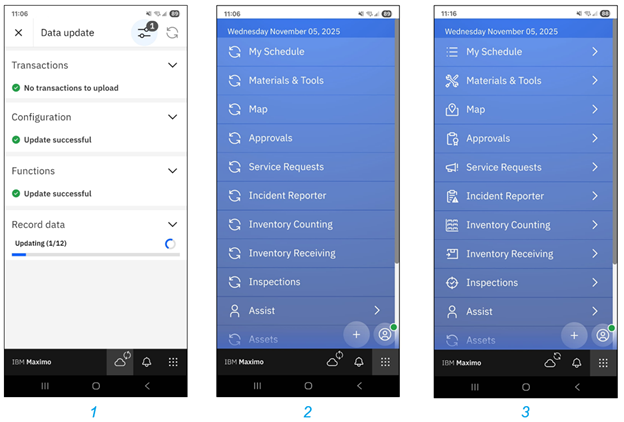
The following occurs when you first log in. Maximo Mobile receives the data from the connected system, and downloads the necessary data sets (1). While this occurs, within the navigation panel you can see the sync status for each application (2) where icons start with the sync, and they eventually update into the applications icon (3).
GIS and Mapping Capabilities
If your organization uses Maximo Spatial, Maximo Mobile capitalizes on mapping functionality, bringing map access directly to users.
- Offline map support: View and interact with maps even when you’re disconnected.
- Outdoor and indoor maps: See your assets across facilities, campuses, or wide outdoor areas.
- Efficient syncing: Delta updates let you synchronize only changes to map data — saving bandwidth and time
Map Features
While in your field of work, your map gives you great access to location-based features that enables you to make smarter decisions. Some of these features are:
- Add or remove map layers
- Saving your current GPS location
- Search for assets or work orders
- View related records right on the map
- Download maps for offline use
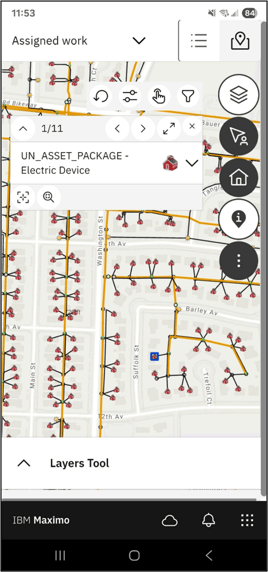
For example, in the image above, I can quickly turn on layers I need to visualize, navigate to an area on the map, and utilize the identify tool to retrieve information from my desired feature.
Here is an overview of some of the applications available within Maximo Mobile, and when they became available (taken from IBM’s Documentation):
|
Application |
Description |
Availability |
|
Approvals |
Approve, assign, and monitor work. This application is visible only to users who have the authority to approve work |
From Maximo Mobile 8.3 and Maximo Application Suite 8.6 |
|
Assets |
See the details of all your assets, including their specifications and associated meters |
From Maximo Application Suite 8.9 |
|
Inspections |
Complete inspections and record inspection results, and create unscheduled inspection |
All releases |
|
Inventory Counting |
Use count books, ad hoc counts, and reconciliation to ensure valid inventory balances. |
From Maximo Application Suite 8.8 |
|
Service Request |
Open a service request to report an issue. |
From Maximo Mobile 8.3 and Maximo Application Suite 8.6 |
|
Receiving |
Storeroom clerks can receive inventory items and shipments by using the Inventory receiving and Shipment receiving options. |
Maximo Application Suite 8.10 |
|
Issues and Transfers |
Storeroom clerks can issue items that are reserved for approved work orders. Users have access to existing inventory usage records on their mobile devices. |
Maximo Application Suite 8.11 |
In short, Maximo Mobile really empowers users to stay connected to their assets, operations, and data, no matter where they are. It is clear that IBM has invested great time and thought into the user’s experience, especially how easy it was to access (as compared to past IBM mobility solutions). For me, that moment at the conference wasn’t just about avoiding a collision, it was a reminder that mobility is at the heart of modern asset management, and Maximo Mobile is just one of the ways to get you there closer, without the door hitting you on the way in 😊
If you have any questions, or would like to know more about Mobility, please feel free to reach out to Interloc.
-1.png?width=383&height=153&name=Untitled%20design%20(23)-1.png)