Database mirroring operates at the database level without enforcing Maximo business rules, creating data integrity risks. EdgeSync operates at the Maximo Business Object (MBO) layer, ensuring transactions replicate as Maximo understands them with full business logic enforcement.
No. EdgeSync supports intermittent and offline connectivity through store-and-forward pipelines. Transactions queue locally during outages and synchronize automatically upon reconnection.
Administrators define which objects (WORKORDER, ASSET, INVENTORY, etc.), attributes, and synchronization directions to enable through profile-driven controls. Large binary fields and sensitive data can be excluded.
Yes. EdgeSync respects Maximo's native role-based access control. API key authentication binds replication agents to high-privilege users, and all traffic is encrypted via TLS/SSL.
Organizations need Maximo administrative access, API key configuration, and Cron Task setup. No database-level access or custom development is required.
Configurable Cron Tasks monitor replication health and lag. Alerts trigger if synchronization falls behind thresholds. Administrators access dashboards through standard Maximo interfaces.
Yes. Automation Scripts can transform data during replication, enabling controlled interoperability between versions—critical for phased enterprise upgrades from 7.6 to MAS.
No. Asynchronous replication means production doesn't wait for DR acknowledgment. Geographic separation doesn't impose performance penalties on the source environment.
Yes. The Mobile Informer Platform has been validated as using IBM Best Practices and as such has earned the badge of Ready for Cloud & Smarter Infrastructure. It is one of the few mobile platforms for Maximo that has earned this distinction.
We like to call Mobile Informer “future-proof,” which means choosing Mobile Informer is a wise investment choice. There are two parts to Mobile Informer:
Mobile Informer is licensed on a named user basis. Mobile Informer Platform Authorized Users and Mobile Informer Industry App Authorized Users can use any and all apps in our suite, in addition to any apps developed for their organization.
The server portion of the Mobile Informer platform is installed as a native application within Maximo and requires no additional mobile-specific hardware. The Mobile Informer server fully supports clustered environments, and can spread processing across the Maximo cluster or can be confined to certain cluster nodes as desired.
Because the Mobile Informer platform sits inside of Maximo as a Maximo application and does not require any additional hardware or software services, it works equally well in an on-premise, hosted, or SaaS environment.
Please see the simple architecture diagram below:
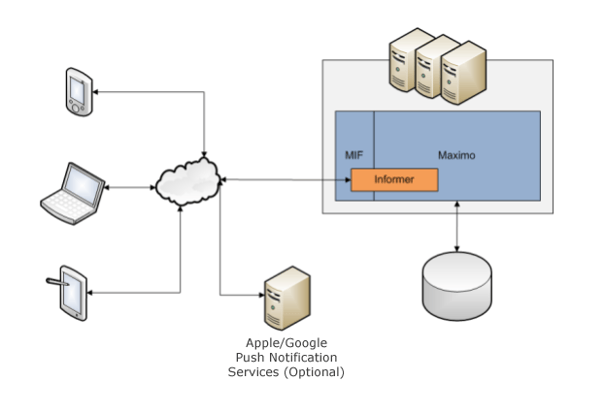
The source code for all Mobile Informer applications is provided to customers at no charge with a user license. Customers have the option to install, modify, and support the applications as they wish.
Rather than rely on proprietary SDK and development toolkits we use the official platform tool kits: Android Studio and Xcode. This makes it easy for an app developer to use the tools they are familiar with to create and modify apps. The apps are built using the native toolkits and thus will have no restrictions and can utilize the features that make each platform unique. Using the unique platform functionality means the full functionality of the platform and hardware is available. Non-native applications rely on a middleware layer that requires proprietary SDKs, IDEs and specialized knowledge requiring additional training.
Mobile Informer is integrated at the MBO layer using the MIF (Maximo Integration Framework). Any applications that are cloned such as WOTRACK will utilize the same MBOs and will work without any additional configuration. Informer supports all custom persistent and non-persistent MBOs, fields, and applications via configuration tools in the Informer Developer application.
Mobile Informer is integrated as a native Maximo application and uses the MIF (Maximo Integration Framework). Mobile Informer will integrate with all existing Maximo integrations to SAP, Peoplesoft, JDE, Tririga and others. All Mobile Informer applications use the Maximo business rules, including any external integrations such as Publish Channels.
"Mobile Informer performs data validation offline at all time, according to business processes. For instance, Users can pick values from lists of Domain Values for actions like changing a Work Order Status or indicating Service Request priority. Similarly, the mobile apps check data validity before submitting changes to Maximo, for example by ensuring appropriate length of free text entry."
Any mobile solution that requires real-time field lookups will not allow the user to create or modify data offline. If the mobility solution needs to be online to perform field lookups it will introduce a performance penalty whenever a lookup needs to be queried.
Mobile Informer downloads the domain values offline and validates business logic offline before being sent to the server.
Mobile Informer will listen for any changes to domain or table values and push the data to the devices. No application or configuration changes will be required.
Mobile Informer is integrated natively into Maximo and will utilize the user’s Maximo security profile. When data is saved back to Maximo it will create a new session using the mobile user’s security profile. All CHANGEBY fields will correctly reflect the user and Maximo restrictions utilized. The user’s security profile will be downloaded to the device so the appropriate restrictions can be performed offline. Informer will listen for changes to the security profile and push them to the devices.
Mobile Informer will integrate Maximo workflows. Most changes to the Maximo workflow will not require changes to the mobile application.
A single JVM MIF server can process thousands of transactions daily. The MIF servers can easily be clustered and load balanced to increase throughput and provide redundancy.
Informer tracks when users log in and out, and a user login creates a LOGINTRACKING audit event.
Yes, Mobile Informer will support multi-site and multi-org configurations. The data available on the device is configured via SQL queries and can be administered through the Informer Maximo application.
Mobile Informer can easily support several hundred thousand offline records. Mobility users only need access to data to support their use cases, not the entire Maximo database. The data that needs to be synchronized to the devices is based on saved Maximo queries.
"In systems where different groups of users need access to different groups of data, the dataset can be partitioned for storage and sync speed optimization."
Because Mobile Informer assumes that the application is always offline, it opportunistically synchronizes data in the background with no user intervention. Mobile Informer downloads the data set each app uses to the onboard device database, and is able to store and query hundreds of thousands of records locally – without high latency network connections or remote servers.
"In most mobility solutions the users have to undertake a series of actions to work offline, and then with a reduced feature set. When working online their experience is degraded by the reduced performance caused by frequent server requests and network latency. Mobile Informer is designed to always work in an offline mode. However, when connected it quietly synchronises data both ways to ensure the user is working with the latest information and that Maximo is up to date. This means the performance is very fast and the feature set is complete whether on or off line."
The Mobile Informer platform continuously monitors the network and state of the Maximo server. It will continuously synchronize data in the background as long as Maximo and the network are both online. If either the network or Maximo is offline, Mobile Informer, in the background, will temporarily stop synchronizing data, without affecting user performance or experience. Mobile Informer will continue to monitor both network and Maximo, and will start synchronizing as soon as an online state is detected.
Mobile applications regularly need access to several hundred thousand records such as assets, locations, Work Orders, inventory, and supporting data. In Maximo, both mobile and desktop users are continuously modifying the data.
The Mobile Informer platform is native to Maximo and is able to listen for changes directly on the MBO layer. When relevant data is modified in Maximo, such as a Work Order status change, Mobile Informer will record the transaction. The transaction will be queued and evaluated and only the relevant changes will be sent to the device.
Mobile Informer applications can optionally use the native Google or Apple push notification architecture rather than polling the server on a timed basis. The result is changes are delivered to the devices faster with less drain on the battery.
Another advantage Mobile Informer has is that it is a native Maximo application. A Maximo system administrator can login to the system and validate which data has been sent to which device.
For example, a technician may report to help desk a Work Order was assigned to them five minutes ago and they cannot see it on their device. The help desk technician can log in to the Mobile Informer application and determine which data and when it was sent to which device.
Mobile Informer handles transactions in a reliable manner though several means.
When a user saves a transaction it is put into an outbound queue. The Mobile Informer platform will continuously monitor the network connection and Maximo server and synchronize the transactions in the background.
One of the key advantages of the Mobile Informer platform is its simplicity. Transactions originate on the mobile device and are sent directly to Maximo via the MIF (Maximo Integration Framework). The process between the mobile device and Maximo is synchronous where the mobile will not mark the message as processed until Maximo acknowledges the transaction is complete it fails MBO validation. There is no middleware or message brokers where the transactions could get lost or stuck.
If a message fails validation such as a Work Order that has been cancelled it will be stored in the Maximo Informer application in the error queue. A Maximo system administrator can view the error as XML and either reprocess it as-is, modify it or delete it.
The mobile devices communicate directly with Maximo via MIF. No additional server software or integrations need to be set up or configured.
Everyone is at a different stage in their Maximo journey. We have solutions for you, no matter how far along you are.
Unlike previous versions of Maximo, MAS is built using a containerized software architecture. The container technology MAS utilizes is Docker. The MAS Docker containers are run on the IBM Red Hat OpenShift orchestration platform. The OpenShift platform runs on dedicated servers and/or VMs which can reside on-premise, in the private cloud, public cloud or a combination of these. OpenShift provides advanced operations capabilities such as auto-scaling and fault tolerance as makes it easy to shift MAS workloads between datacenters, if desired. IBM’s Cloud Pak for Data is also required for MAS. OpenShift and Cloud Pak for Data licenses are included with MAS Application Points.
OpenShift can be easily updated between minor versions via the web console or CLI. Please see https://docs.openshift.com/container-platform/4.5/updating/updating-cluster-between-minor.html for details..
No, WebSphere Liberty is deployed with the installation.
Kafka is licensed by an opensource Apache 2.0 license and is free to use. To install Kafka into OCP you would use the Strimzi operator.
Yes. MAS Manage does support SQL Server/DB2/Oracle outside of OpenShift containers.
MAS can be installed in an existing OCP or new OCP.
Manage can support Databases external to the OCP environment. The other MAS applications such as Monitor/IoT/Predict require the Database to reside within the same OCP environment.
Full access to Oil & Gas is a Manage Industry Solution (IS) and can be accessed by Premium User Types (15 AppPoints). There is an Oil and Gas “Limited” option available that can be accessed by a Limited User (5 AppPoints). There are no Install points required for Oil & Gas. A Limited Industry Solution user follows the same rules as standard Limited. They are restricted to using 3 modules. In the case of the Industry Solution variety one of those modules could be selected from an industry solution or include applications within it that are industry solution specific. Specific Limited IS licenses were also previously sold under the same guidelines – 3 modules only.
There is a license server embedded in MAS to manage the app point pool. When a user logs in they consume a number of AppPoints based the license types they are assigned, when they log out these AppPoints are returned to the pool.
Both usage and access affects AppPoints consumption. Consumption is based on concurrent usage. The amount of AppPoints consumed by a user is first determined by their User Type which is based on their security profile (ie. “what they have access to”). The User Types are Limited (5 points), Base (10 points) and Premium (15 points). There are also Install Points required for certain Industry Solutions and Add-ons such as Spatial and ERP integration adapters.
When a user logs in, the AppPoints associated with their User Type is consumed from the AppPoint pool. When they log-off, the points are returned to the pool.
It’s important to note that all User Types (Limited, Base, and Premium) include usage of Monitor AND Mobile. This provides a lot of incentive to take advantage both of Monitor and Mobile.
Guidance from IBM is that you need to complete the subscription term for your token contract before you can migrate to App Points. There may be options to convert earlier, but you will need to discuss with IBM.
Starting with MAS 8.4, you can have multiple Maximo environments (e.g., PRD, TST, DEV) point to the Suite License Server (SLS) server that manages your purchased AppPoints (e.g., 1,000 AppPoints can be shared between those environments). Alternatively, you can allocate and track AppPoints by Maximo environment
(e.g., 800 AppPoints for PRD, 150 AppPoints for TST, 50 AppPoints for DEV). All users, regardless of which instance they are using (PRD, TST, DEV), consume points from the AppPoints pool.
Limited Use licenses can be used with any three modules excluding the Administrative modules
and applications. Express User allows for viewing reports, read-only access, status changes, and updates to assigned work orders.
MAS can be run on-prem or in the Cloud (public or private). But regardless of where MAS is located, it requires OpenShift.
Watson Machine learning (a component of Cloud Pak for Data (CP4D)) is only required for Maximo Health and Predict. But there is no requirement for a connection to IBM Cloud to run Watson Machine Learning. The service is self-contained in CP4D and therefore is supported in any environment including on-prem.
Yes, as of MAS 8.3 it will work with Maximo 7.6.1.2. However current Maximo users that have not yet transitioned to AppPoints are not entitled to MAS (including Mobile or Monitor). Organizations that do make the transition to AppPoints will be entitled to MAS, but are not required to replatform right away. In other
words, you will able to stay on your existing Maximo infrastructure and be entitled to the other solutions in the Application Suite, such as Monitor, Mobile, Health and Predict.
Maximo required to be at version 7.6.1.2 or higher prior to MAS upgrade.
Data coming into Monitor can be stored into the data lake established by the User/Admin. Monitor can read from historians or consume the data directly from the devices.
Yes, Manage includes Spatial, which requires a separate install.
No. Purchasing MAS application points includes OpenShift Container Platform (OCP) entitlements with restrictions on use.
Yes, an http server is part of the workload container deployed to OCP.
Images are always pulled from IBM entitlement registry. You’re able to pre-pull (download and store) the images into a local registry for use in “air-gapped” installations, that is installations without access to the internet. We believe it would require customizing some of the YAMLs in the installation process. More will be known once MAS 8.4 is released.
Read only access to everything is available to LIMITED, BASE and PREMIUM user types.
Correct, db’s are independent and can be hosted either containerized or remote (outside of OpenShift) and are not considered an environment.
No. The MAS containers will be running a Linux kernel. The OpenShift nodes will be running RHEL or RCOS.
Yes.
RulesManager works as it does today in a liberty workload containerized environment.
While containerized Maximo running RM will still be able to read XML files, it will be recommended to move to RMDB.
The SAML configuration is performed in the MAS administration page, where you would generate your SP metadata, and import the IdP metadata. There is no need to add the SAML application.
Yes, IBM has made reference to an admin pod for doing updatedb/configdb etc., where those type of functions are performed.
The spatial installation license is not included in the Maximo for Utilities industry solution in MAS.
No...ICD sits outside of MAS.
App point usage will be monitored and controlled using the app point license server that is embedded in MAS. The licenses usage monitor apps in Maximo will be available in Manage, and can provide guidance for assigning license types to users, but assigning license type to MAS users is manual.
Install licenses are per environment.